Showing posts with label SQL Functions. Show all posts

SQL User Define Function to Replace String

Create User Define Function that will Replace string from Column. So that Query or Stored Procedure remain neat.
 
 
Eg.


Create function dbo.ReplaceAddress (@input Varchar(250))
 
Returns Varchar(250)
 
 
As
 
Begin
 
Declare @Address Varchar(250)
Set @Address = @Input
Set @Address = Replace(Replace(Replace(Replace(@Address,' Drive' , ' .Dr'), ' Avenue', ' Ave.'), ' Road' ,' Rd.'), ' Street' , ' St.')
 
Return @Address
 
End
 
Here is Before and After Screenshot using UDF


Calculated Age Column in SQL Server Using Function

Function to Calculate Age Column based on Floor.


Create FUNCTION [dbo].[fnCalcAge]


(


   @DOB datetime, -- Provide Column name of BirthDate.

   @CurrentDate datetime -- Provide Date or getdate() for Current Date.

 
)


RETURNS real


AS


BEGIN


    RETURN FLOOR(((DATEDIFF(dd, @DOB, @CurrentDate) +

    CASE WHEN DATEPART(mm, @DOB) = DATEPART(mm, @CurrentDate) AND

    DATEPART(dd, @DOB) = DATEPART(dd, @CurrentDate)

    THEN 1 ELSE 0 END) / 365.25) / .25) * .25


END

 
GO


Use function with calculated age column :

For eg. Column name is BirthDate


([dbo].[fnCalcAge]([BirthDate],getdate()))


User Define Function When LTrim and RTrim not Working

Ltrim and RTrim not always Working to remove white space from column because of the special character at end. It may be because user try to copy from word or excel. In that case use following function to remove space.

The UDF


CREATE FUNCTION [dbo].[udfTrim]

(
 
 
            @StringToClean as varchar(8000)
)
 
 
RETURNS varchar(8000)


AS
 
 
BEGIN

--Replace all non printing whitespace characers with Characer 32 whitespace

--NULL

Set @StringToClean = Replace(@StringToClean,CHAR(0),CHAR(32));

--Horizontal Tab

Set @StringToClean = Replace(@StringToClean,CHAR(9),CHAR(32));

--Line Feed

Set @StringToClean = Replace(@StringToClean,CHAR(10),CHAR(32));

--Vertical Tab

Set @StringToClean = Replace(@StringToClean,CHAR(11),CHAR(32));

--Form Feed

Set @StringToClean = Replace(@StringToClean,CHAR(12),CHAR(32));

--Carriage Return

Set @StringToClean = Replace(@StringToClean,CHAR(13),CHAR(32));

--Column Break

Set @StringToClean = Replace(@StringToClean,CHAR(14),CHAR(32));

--Non-breaking space

Set @StringToClean = Replace(@StringToClean,CHAR(160),CHAR(32));


Set @StringToClean = LTRIM(RTRIM(@StringToClean));

Return @StringToClean


END

GO
 
 
-------------------------------------------------------------------

Convert SQL Text Column to Date

Convert Column to Date


--Suppose there is Text Column in SQL Server


--Suppose you want to extract only Date out of it.

--First create the following function to extract numeric data

CREATE FUNCTION dbo.udf_GetNumeric
(@strAlphaNumeric VARCHAR(256))RETURNS VARCHAR(256)AS
BEGIN
DECLARE
@intAlpha INT
SET
@intAlpha = PATINDEX('%[^0-9]%', @strAlphaNumeric)BEGIN
WHILE
@intAlpha > 0
BEGIN
SET
@strAlphaNumeric = STUFF(@strAlphaNumeric, @intAlpha, 1, '' )SET @intAlpha = PATINDEX('%[^0-9]%', @strAlphaNumeric )END
END
RETURN
ISNULL(@strAlphaNumeric,0)ENDGO


-- Now Update Column with Function 


Update Employee

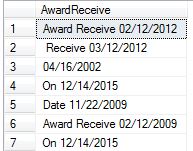
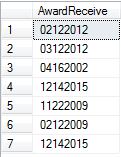
Set AwardReceive = [dbo].[udf_GetNumeric](AwardReceive)


--- You will get following result 


-- Use following 

Select AwardReceive,Left(AwardReceive,2) +'/'+ Substring(AwardReceive,3,2)+'/'+Right(AwardReceive,4)

from employee 

-- You will get following result


-- Now Update the Column and Change Data Type 

Update Employee

Set AwardReceive = Left(AwardReceive,2) +'/'+ Substring(AwardReceive,3,2)+'/'+Right(AwardReceive,4)


Split One Column to 2 column - SQL Query

Split One Column to 2 column from comma separator using SUBSTRING, LEFT, LEN Functions


Select

[CorpGroupName],

[Div],

[Corps],

left([Corps], charindex(',', [Corps])-1) as City,

SUBSTRING([Corps], CHARINDEX(',', [Corps]) + 1, LEN([Corps])) as [State]

From [dbo].[Corp]


In Built Function in T-SQL - Reverse

Reverse - Returns the reverse of a character expression.
REVERSE( character_expression )


For Eg.


Select CompanyName,


Reverse(CompanyName) As ReverseName,


Reverse(Left(CompanyName,5)) As ReverseFirst5Char,


Reverse (Right (CompanyName,5)) As ReverseLast5Char


From Customers


Result