SSRS Expression to convert Second to Hours

Following Expression in SSRS will convert Second to Hours Minutes Second Format

HH : MM : SS


=Floor(sum(Fields!Second.Value)/ 3600) &":"& Format(DateAdd("s", sum(Fields!Second.Value), "00:00"),"mm:ss")


Following Expression in SSRS will convert Second to Days Hours Minutes Second Format

DD :HH : MM : SS


=Floor(sum(Fields!Second.Value) / 86400) &":"& Format(DateAdd("s", sum(Fields!Second.Value), "00:00:00"), "HH:mm:ss")


Exampe From Report


Creating View in SQL Server

You Can Create View in SQL by witting Query.

You Can Use SCHEMABINDING in View to hide definition of View.

By SCHEMABINDING on View you Cannot Use

-Union or Union All in View
-Distinct in View
-Sub Query and Self-Join in View
-Complex Aggregate Functions in View.

Convert SQL Text Column to Date

Convert Column to Date


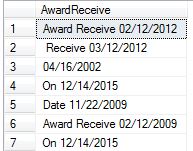
--Suppose there is Text Column in SQL Server


--Suppose you want to extract only Date out of it.

--First create the following function to extract numeric data

CREATE FUNCTION dbo.udf_GetNumeric
(@strAlphaNumeric VARCHAR(256))RETURNS VARCHAR(256)AS
BEGIN
DECLARE
@intAlpha INT
SET
@intAlpha = PATINDEX('%[^0-9]%', @strAlphaNumeric)BEGIN
WHILE
@intAlpha > 0
BEGIN
SET
@strAlphaNumeric = STUFF(@strAlphaNumeric, @intAlpha, 1, '' )SET @intAlpha = PATINDEX('%[^0-9]%', @strAlphaNumeric )END
END
RETURN
ISNULL(@strAlphaNumeric,0)ENDGO


-- Now Update Column with Function 


Update Employee

Set AwardReceive = [dbo].[udf_GetNumeric](AwardReceive)


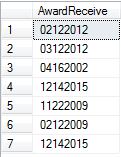
--- You will get following result 


-- Use following 

Select AwardReceive,Left(AwardReceive,2) +'/'+ Substring(AwardReceive,3,2)+'/'+Right(AwardReceive,4)

from employee 

-- You will get following result


-- Now Update the Column and Change Data Type 

Update Employee

Set AwardReceive = Left(AwardReceive,2) +'/'+ Substring(AwardReceive,3,2)+'/'+Right(AwardReceive,4)


Phone Constraint in SQL

To Add Constraint to Any SQL Table Phone Column use following Script. 


ALTER TABLE [dbo].[Employee]  WITH CHECK ADD  CONSTRAINT [Ck_Phone_Employee]
CHECK  

(

[Phone] like '[1-9][0-9][0-9][-][0-9][0-9][0-9][-][0-9][0-9][0-9][0-9]' OR
[Phone] like '[1-9][0-9][0-9][-][0-9][0-9][0-9][-][0-9][0-9][0-9][0-9][*][0-9]' OR
[Phone] like '[1-9][0-9][0-9][-][0-9][0-9][0-9][-][0-9][0-9][0-9][0-9][*][0-9][0-9]' OR
[Phone] like '[1-9][0-9][0-9][-][0-9][0-9][0-9][-][0-9][0-9][0-9][0-9][*][0-9][0-9]
[0-9]'
OR
[Phone] like '[1-9][0-9][0-9][-][0-9][0-9][0-9][-][0-9][0-9][0-9][0-9][*][0-9][0-9]
[0-9][0-9]' 
OR
[Phone] like '[1-9][0-9][0-9][-][0-9][0-9][0-9][-][0-9][0-9][0-9][0-9][*][0-9][0-9
][0-9][0-9][0-9]'

)
GO

ALTER TABLE [dbo].[Employee] CHECK CONSTRAINT [Ck_Phone_Employee]

GO


This will Add Constraint with Phone Extension. Use Data Type Varchar(18) for Phone Column 

Find Non Integer From SQL Column

If you want to find Non-Integer from Column in SQL Server  that does not have Data Type integer , Use following SQL Query.


Select *  From [ChildRegistration]
    Where IsNumeric(ChildID + '.0e0') = 0


If you want to find Integer from Column in SQL Server  that does not have Data Type integer , Use following SQL Query.


Select *  From [ChildRegistration]
    Where IsNumeric(ChildID + '.0e0') = 1

Add Identity Column and Populate Column in SQL Server

Add Column using SQL Statment and Populate Identity Column in SQL Server

Alter Table ChildRegistration
Add RegistrationID  Int Identity(1000000,10)

1000000 Means Value Start with 1000000 and adding in 10 increment.

Add Default Constraint GetDate() to Existing Column

Add constraint default getdate to existing column


Alter table [dbo].[Child]
Add Constraint DF_Last Default Getdate() For [LastUpdate]